




Details
Be an ATC in MSFS 2024
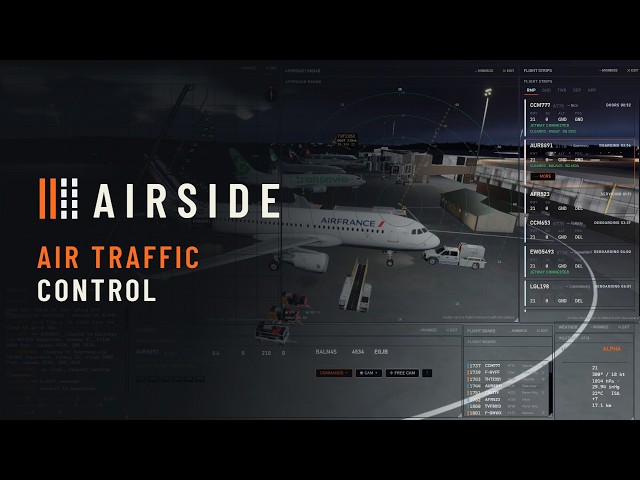
You sit down at the desk, and the field is already busy. Aircraft at the gates are still boarding. One is ready to push back. Two more are on final. Every one of them is waiting for a call from you.
Say it, and it happens. Hold a key and speak, the way you have heard it done a hundred times. Or pick the aircraft and press the button. The crew answers you either way.
Flights land, park, take their bags and their fuel, and go out again on the next leg. Nothing is set up by hand and nothing repeats itself. You turn up, and there is a day waiting for you. You choose how hard it should be: a quiet field where you can take your time, or an hour with no gaps in it at all.
The gates, the stands, the taxiways and the runways come from the simulator, so your home field is there already and so is everywhere else. Real airlines, going to places they really fly to. Every crew gets a voice, dealt from 54 voices in a range of accents.
Every airport in the world. Every country in the world. 292 airlines, and 2,599 aircraft in real airline liveries with the free FSLTL traffic set installed.
Airside is ground and tower on one frequency. You buy it once and it stays yours. Updates are included and not charged for: no subscription, and nothing to renew.
Try it free for an hour first: https://airsideatc.com
The hour starts the first time Airside opens on your computer.
Tags
Requirements
Microsoft Flight Simulator 2024, on Windows 10 or 11.
2048 MB of memory for Airside itself, on top of the simulator.
An internet connection, needed when Airside starts.
A microphone only if you want to speak your calls. You can press the buttons instead.
Turn the simulator's own aircraft traffic off before your first shift.
The download here is the installer, which is small. The first time you run it, it fetches about 570 MB. Airside takes about 720 MB on disk, so keep 2 GB free on the drive you put it on.
Recommended Products

€ 20.00
$
USD 22.92
All sales based on Euro. Other currencies shown as reference only.£
GBP 17.18
All sales based on Euro. Other currencies shown as reference only.¥
CNY 153.51
All sales based on Euro. Other currencies shown as reference only.
€ 9.00
$
USD 10.31
All sales based on Euro. Other currencies shown as reference only.£
GBP 7.73
All sales based on Euro. Other currencies shown as reference only.¥
CNY 69.08
All sales based on Euro. Other currencies shown as reference only.
€ 30.00
$
USD 34.38
All sales based on Euro. Other currencies shown as reference only.£
GBP 25.76
All sales based on Euro. Other currencies shown as reference only.¥
CNY 230.26
All sales based on Euro. Other currencies shown as reference only.
14.99
€ 10.49
$
USD 17.18
All sales based on Euro. Other currencies shown as reference only.£
GBP 12.87
All sales based on Euro. Other currencies shown as reference only.¥
CNY 115.06
All sales based on Euro. Other currencies shown as reference only.
-30%
30-day price low:
€
10.49

€ 13.90
$
USD 15.93
All sales based on Euro. Other currencies shown as reference only.£
GBP 11.94
All sales based on Euro. Other currencies shown as reference only.¥
CNY 106.69
All sales based on Euro. Other currencies shown as reference only.
€ 27.49
$
USD 31.50
All sales based on Euro. Other currencies shown as reference only.£
GBP 23.61
All sales based on Euro. Other currencies shown as reference only.¥
CNY 211.00
All sales based on Euro. Other currencies shown as reference only.
€ 25.20
$
USD 28.88
All sales based on Euro. Other currencies shown as reference only.£
GBP 21.64
All sales based on Euro. Other currencies shown as reference only.¥
CNY 193.42
All sales based on Euro. Other currencies shown as reference only.
€ 50.00
$
USD 57.30
All sales based on Euro. Other currencies shown as reference only.£
GBP 42.94
All sales based on Euro. Other currencies shown as reference only.¥
CNY 383.77
All sales based on Euro. Other currencies shown as reference only.