




Details
Extend your HEMS flying into the Dolomites
For the most immersive HEMS experience, we strongly recommend pairing this free Pelikan 2 base with MESHBORNE DOLOMITI VOLUME 1 for MSFS 2024 — available on simMarket. Take your simulated rescue flights beyond the hospital, with 44 recreated mountain huts, 82 lift installations and 26 selectable helicopter landing sites across selected Dolomites destinations. Plan mountain pickups, medical transfers and return flights to Bressanone in a more recognisable alpine setting.
Dolomiti Volume 1 is a separate, optional premium scenery. This Bressanone download is completely free and works independently. Aircraft, liveries and mission systems are separate; no scripted HEMS missions are included.
???????? Pelikan 2 | Bressanone Hospital / Krankenhaus Brixen
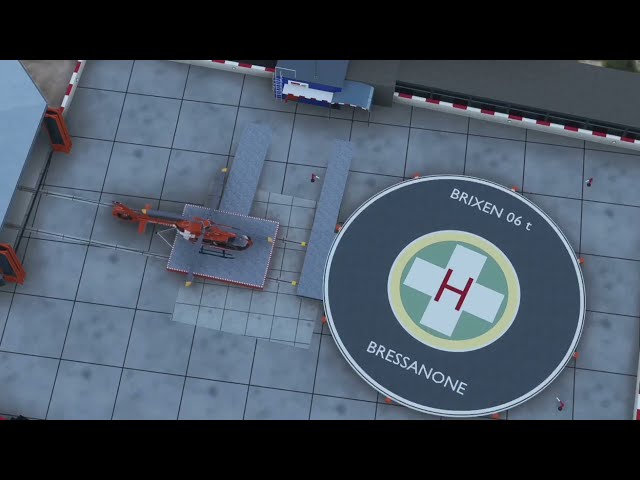
Fly to the hospital of Bressanone (Brixen), home of the real-world Pelikan 2 rescue helicopter base in South Tyrol, Italy. This MESHBORNE scenery recreates the hospital complex and adjoining helibase for Microsoft Flight Simulator 2024 on Windows PC, with a raised circular helipad, detailed hangar and an animated helicopter transfer dolly.
The helipad and the surrounding base area have been recreated as faithfully as possible to their real-world counterparts.
From the hospital buildings and apron to the hangar interior and night lighting, the scenery gives your virtual medical transfers a distinctive destination. Land beside the hospital, shut down on the trolley and let it carry your helicopter into the hangar.
Scenery highlights
-
Main hospital complex, historic building, rehabilitation and civil protection buildings, and the neighbouring sports field.
-
Raised circular helipad with markings and lights, walled apron and base building.
-
Modelled hangar interior, rails and transfer trolley.
-
Animated hangar dolly included in the scenery package.
-
Fabric windsock that responds to the simulator wind.
-
Helipad and obstacle lights, plus illuminated windows for evening and night operations.
-
Selectable world-map departure: Ospedale Bressanone (XSBX).
Animated hangar dolly
The dolly is the rail-mounted trolley that carries your helicopter in and out of the hangar. It is included in the scenery: install the single package folder in Community to use both the hospital scenery and the animated trolley.
Rest position: outside the hangar, next to the round helipad.
To enter the hangar:
-
Land on the trolley and shut down. Once the engines are off and the rotor has stopped, the trolley rolls into the hangar with your helicopter after about 10 seconds. The journey takes about one minute.
-
Alternatively, while stationary on the trolley with the engine off, switch the battery from ON to OFF.
-
If you switch the battery off while the rotor is still turning, the trolley waits until the rotor stops before rolling in.
-
Automatic roll-in after shutdown only triggers if the engine has run during the current flight. If you start cold and dark on the trolley, it remains stationary until you switch the battery from ON to OFF.
To leave the hangar:
-
Switch the battery from OFF to ON, or start the engine. The trolley rolls out to its rest position and releases the helicopter there.
-
If you switch the battery off while the trolley is rolling out, it returns inside the hangar.
Other behaviour and compatibility:
-
The helicopter is held on the trolley while it moves.
-
Off-centre landings are eased onto the trolley axis over the first few metres, so the rotor blades clear the hangar doors.
-
Loading a flight with the helicopter parked on the rails inside the hangar places the helicopter on the trolley.
-
Entering slew mode, or moving the helicopter away, cancels the movement and sends the trolley back outside.
-
Works with helicopters that use the standard engine and rotor variables. Tested with the Asobo H125 and HPG H145.
Finding the base
Search the MSFS world map for Ospedale Bressanone or XSBX. XSBX is a fictional identifier used by this scenery in the simulator.
Location: Bressanone / Brixen, South Tyrol, Italy.
Coordinates: 46.7251 N, 11.6479 E.
Helipad deck elevation: approximately 573 m / 1,880 ft.
Installation and requirements
-
Close Microsoft Flight Simulator 2024 and extract the downloaded ZIP.
-
If you have an earlier version installed, move the old hospital package and any separate dolly module out of your active Community folder. Check any Addons Linker entries too, so only the new unified package is active.
-
Drag the single meshborne-bressanone-hospital folder extracted from the ZIP into your active Community folder. The hospital scenery and animated dolly are included together; no second folder or separate dolly download is needed.
-
Make sure manifest.json and layout.json are directly inside that scenery folder, without an extra nested directory.
-
Restart the simulator and create a flight at Ospedale Bressanone / XSBX.
Microsoft Flight Simulator 2024, Windows PC; minimum game version 1.9.21 as specified in the package. Approximately 240 MB installed. No separate scenery library is required. Remove conflicting scenery for this same hospital or heliport to avoid overlapping buildings and pads. MSFS 2020 and Xbox compatibility are not provided.
Version 1.1.3: first public release, with the animated hangar dolly included.
MESHBORNE
For future news, special discounts and direct support, join our Discord.
Explore our scenery at meshborne.com. Technical support: info@meshborne.com. Helicopters, liveries and other add-ons shown in screenshots are not included. Real-world names identify the locations represented and remain the property of their respective owners. Free scenery: please link to the official download page instead of re-uploading or selling it. Contains information from © OpenStreetMap contributors, available under the ODbL.
???????? Estendi i tuoi voli HEMS alle Dolomiti
Per un'esperienza HEMS il più possibile immersiva, consigliamo vivamente di abbinare questa base gratuita Pelikan 2 a MESHBORNE DOLOMITI VOLUME 1 per MSFS 2024 — disponibile su simMarket. Porta i tuoi voli di elisoccorso virtuale oltre l'ospedale, con 44 rifugi ricreati, 82 impianti di risalita e 26 punti di atterraggio per elicotteri selezionabili, distribuiti in località scelte delle Dolomiti. Pianifica recuperi in montagna, trasferimenti sanitari e rientri a Bressanone in un ambiente alpino più riconoscibile.
Dolomiti Volume 1 è uno scenario premium separato e facoltativo. Bressanone è completamente gratuito e funziona anche da solo. Elicotteri, livree e sistemi di missione sono separati: questo download non include missioni HEMS preimpostate.
Ospedale di Bressanone / Krankenhaus Brixen | Base Pelikan 2
Raggiungi l'ospedale di Bressanone, sede della base reale dell'elicottero di soccorso Pelikan 2, in Alto Adige. Lo scenario MESHBORNE ricrea il complesso ospedaliero e l'annesso eliporto per Microsoft Flight Simulator 2024 su PC Windows, con piazzola circolare sopraelevata, hangar dettagliato e dolly animato per il trasferimento dell'elicottero.
La piazzola e l'area circostante della base sono state ricreate nel modo più fedele possibile alla realtà.
Caratteristiche
-
Complesso ospedaliero principale, edificio storico, strutture di riabilitazione e protezione civile, campo sportivo adiacente.
-
Piazzola circolare sopraelevata con segnaletica e luci, piazzale delimitato e edificio della base.
-
Interno dell'hangar modellato, binari e carrello di trasferimento.
-
Dolly animato incluso nel pacchetto dello scenario.
-
Manica del vento in tessuto animata in base al vento del simulatore.
-
Luci della piazzola e degli ostacoli, finestre illuminate per i voli serali e notturni.
-
Partenza selezionabile sulla mappa: Ospedale Bressanone (XSBX).
Come funziona il dolly
Il dolly è il carrello su binari che porta l'elicottero dentro e fuori dall'hangar. È integrato nello scenario: basta installare l'unica cartella del pacchetto nella Community per avere sia l'ospedale sia il carrello animato.
Posizione di riposo: fuori dall'hangar, accanto alla piazzola rotonda.
Per entrare nell'hangar:
-
Atterri sul carrello e spegni. Quando i motori sono spenti e il rotore è fermo, dopo circa 10 secondi il carrello entra con l'elicottero sopra. Ci mette circa un minuto.
-
Oppure, fermo sul carrello e a motore spento, porti la batteria da accesa a spenta.
-
Se spegni la batteria mentre il rotore gira ancora, il carrello entra appena il rotore si ferma.
-
L'entrata automatica dopo lo spegnimento scatta solo se in quel volo il motore ha girato. Se parti “cold and dark” già sul carrello, il carrello resta fermo finché non porti la batteria da accesa a spenta.
Per uscire:
-
Batteria da spenta ad accesa, oppure avvio del motore: il carrello esce fino alla posizione di riposo e lì libera l'elicottero.
-
Se spegni la batteria mentre sta uscendo, torna dentro.
Altri comportamenti e compatibilità:
-
Mentre il carrello si muove, l'elicottero resta bloccato sopra.
-
Se sei atterrato un po' fuori centro, nei primi metri viene portato sull'asse, così le pale passano tra le ante del portone.
-
Se carichi un volo con l'elicottero parcheggiato dentro l'hangar sui binari, l'elicottero viene messo sul carrello.
-
Lo slew, o spostare l'elicottero, annulla il movimento e rimanda fuori il carrello.
-
Funziona con gli elicotteri che usano le variabili standard di motore e rotore. Provato con l'H125 Asobo e l'H145 HPG.
Posizione, installazione e requisiti
Cerca Ospedale Bressanone oppure XSBX nella mappa di MSFS. XSBX è un identificativo fittizio utilizzato da questo scenario nel simulatore. Coordinate: 46.7251 N, 11.6479 E. Quota della piazzola: circa 573 m / 1.880 ft.
-
Chiudi Microsoft Flight Simulator 2024 ed estrai lo ZIP scaricato.
-
Se hai una versione precedente, sposta il vecchio pacchetto dell'ospedale e un eventuale modulo dolly separato fuori dalla Community attiva. Controlla anche i collegamenti di Addons Linker: deve restare attivo solo il nuovo pacchetto unificato.
-
Trascina l'unica cartella meshborne-bressanone-hospital estratta dallo ZIP nella Community attiva. Ospedale e dolly animato sono inclusi insieme: non servono una seconda cartella né un download separato per il carrello.
-
Controlla che manifest.json e layout.json siano direttamente dentro quella cartella, senza una cartella annidata aggiuntiva.
-
Riavvia il simulatore e crea un volo a Ospedale Bressanone / XSBX.
Microsoft Flight Simulator 2024 per PC Windows, versione minima 1.9.21 indicata nel pacchetto. Circa 240 MB installati. Nessuna libreria separata necessaria. Rimuovi altri scenari dello stesso ospedale o eliporto per evitare sovrapposizioni. Non è fornita compatibilità con MSFS 2020 o Xbox.
Versione 1.1.3: prima versione pubblica, con dolly animato integrato.
Per novità, sconti speciali e supporto diretto, unisciti al nostro Discord.
Altri progetti su meshborne.com. Assistenza: info@meshborne.com. Elicotteri, livree e altri add-on mostrati nelle immagini non sono inclusi. I nomi reali identificano i luoghi rappresentati e rimangono dei rispettivi titolari. Scenario gratuito: condividi la pagina ufficiale, senza ricaricare o vendere il pacchetto. Contiene informazioni di © OpenStreetMap contributors, disponibili sotto licenza ODbL.
Тэги
ПРИМЕЧАНИЯ
Этот продукт оснащен нашей технологией simInstaller и доступен только после покупки через APP
Требования
Microsoft Flight Simulator 2024 for Windows PC, minimum game version 1.9.21. Approximately 240 MB installed. No separate scenery library required.
Рекомендации для вас

€ 6.00
$
USD 6.69
Все продажи указаны в евро. Другие валюты показаны только для справки.£
GBP 5.02
Все продажи указаны в евро. Другие валюты показаны только для справки.¥
CNY 44.61
Все продажи указаны в евро. Другие валюты показаны только для справки.
€ 23.99
$
USD 26.75
Все продажи указаны в евро. Другие валюты показаны только для справки.£
GBP 20.07
Все продажи указаны в евро. Другие валюты показаны только для справки.¥
CNY 178.35
Все продажи указаны в евро. Другие валюты показаны только для справки.
€ 8.99
$
USD 10.02
Все продажи указаны в евро. Другие валюты показаны только для справки.£
GBP 7.52
Все продажи указаны в евро. Другие валюты показаны только для справки.¥
CNY 66.83
Все продажи указаны в евро. Другие валюты показаны только для справки.
€ 17.99
$
USD 20.06
Все продажи указаны в евро. Другие валюты показаны только для справки.£
GBP 15.05
Все продажи указаны в евро. Другие валюты показаны только для справки.¥
CNY 133.74
Все продажи указаны в евро. Другие валюты показаны только для справки.
14.95
€ 9.87
$
USD 16.67
Все продажи указаны в евро. Другие валюты показаны только для справки.£
GBP 12.51
Все продажи указаны в евро. Другие валюты показаны только для справки.¥
CNY 111.14
Все продажи указаны в евро. Другие валюты показаны только для справки.
-34%
30-дневная минимальная цена:
€
14.95

€ 9.99
$
USD 11.14
Все продажи указаны в евро. Другие валюты показаны только для справки.£
GBP 8.36
Все продажи указаны в евро. Другие валюты показаны только для справки.¥
CNY 74.27
Все продажи указаны в евро. Другие валюты показаны только для справки.
€ 20.96
$
USD 23.37
Все продажи указаны в евро. Другие валюты показаны только для справки.£
GBP 17.53
Все продажи указаны в евро. Другие валюты показаны только для справки.¥
CNY 155.82
Все продажи указаны в евро. Другие валюты показаны только для справки.
€ 19.00
$
USD 21.19
Все продажи указаны в евро. Другие валюты показаны только для справки.£
GBP 15.90
Все продажи указаны в евро. Другие валюты показаны только для справки.¥
CNY 141.25
Все продажи указаны в евро. Другие валюты показаны только для справки.