




Details
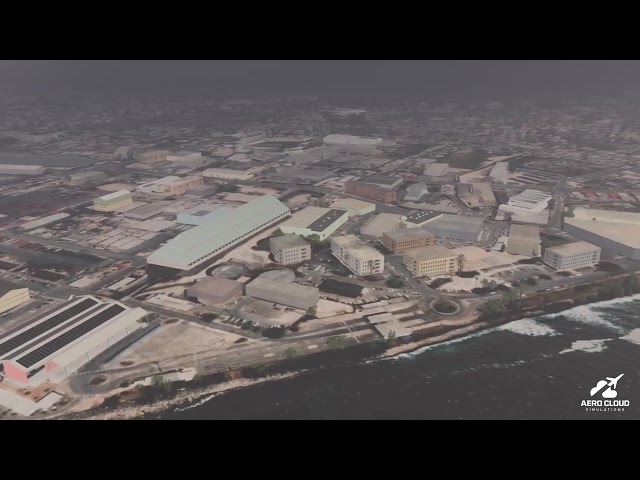
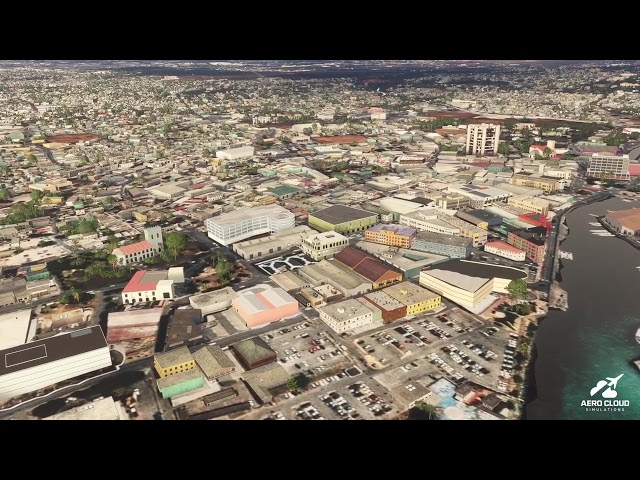
Explore Barbados’s capital from the cockpit. Aero Cloud Simulations’ Bridgetown City Scenery adds custom 3D buildings to Microsoft Flight Simulator 2024, giving low-level flights and sightseeing loops a city worth slowing down for. Larger commercial blocks rise above the surrounding low-rise streets, while varied roofs, façades and building silhouettes give you details to pick out on each pass.
See Bridgetown at flying height
Take a light aircraft up for a relaxed city tour, circle back in a helicopter, or use the city as a visual waypoint on a longer Barbados flight. From farther out, the larger buildings help you pick out the cityscape. Fly closer to spot the mix of shops, residential blocks and commercial buildings.
From morning light to blue hour
Try a clear morning to see rooftop shapes and façades, then return at golden hour for longer shadows or at blue hour when illuminated windows stand out. The gallery shows five in-simulator looks: clear morning, scattered clouds, golden hour, blue hour and rainy-season conditions. Choose your own time and weather in the simulator to see how the city changes.
What’s included
• 192 handcrafted 3D models for Bridgetown, Barbados
• Four levels of detail (LODs) per model
• A mix of low-rise buildings and larger commercial blocks, with textured roofs and façades
• Night-time window lighting, shown in the gallery
• One Microsoft Flight Simulator 2024 scenery package, version 1.0.0
This is a city scenery add-on, not an airport package.
Community and support
Join the Aero Cloud Simulations Discord for installation help, questions and feedback: https://discord.gg/7xP6BxqdXQ
Tags
Notes
This product features our simInstaller technology and can be installed automatically via our APP after purchase.
Requirements
Microsoft Flight Simulator 2024 for Windows PC. MSFS 2020 is not supported.
Recommended Products

€ 19.90
$
USD 21.80
All sales based on Euro. Other currencies shown as reference only.£
GBP 16.62
All sales based on Euro. Other currencies shown as reference only.¥
CNY 145.09
All sales based on Euro. Other currencies shown as reference only.
14.99
€ 8.99
$
USD 16.42
All sales based on Euro. Other currencies shown as reference only.£
GBP 12.52
All sales based on Euro. Other currencies shown as reference only.¥
CNY 109.30
All sales based on Euro. Other currencies shown as reference only.
-40%
30-day price low:
€
9.99

€ 6.50
$
USD 7.12
All sales based on Euro. Other currencies shown as reference only.£
GBP 5.43
All sales based on Euro. Other currencies shown as reference only.¥
CNY 47.39
All sales based on Euro. Other currencies shown as reference only.
20.99
€ 17.84
$
USD 23.00
All sales based on Euro. Other currencies shown as reference only.£
GBP 17.53
All sales based on Euro. Other currencies shown as reference only.¥
CNY 153.04
All sales based on Euro. Other currencies shown as reference only.
-15%
30-day price low:
€
20.99

€ 7.99
$
USD 8.75
All sales based on Euro. Other currencies shown as reference only.£
GBP 6.67
All sales based on Euro. Other currencies shown as reference only.¥
CNY 58.26
All sales based on Euro. Other currencies shown as reference only.
€ 10.00
$
USD 10.96
All sales based on Euro. Other currencies shown as reference only.£
GBP 8.35
All sales based on Euro. Other currencies shown as reference only.¥
CNY 72.91
All sales based on Euro. Other currencies shown as reference only.
15.99
€ 11.51
$
USD 17.52
All sales based on Euro. Other currencies shown as reference only.£
GBP 13.35
All sales based on Euro. Other currencies shown as reference only.¥
CNY 116.59
All sales based on Euro. Other currencies shown as reference only.
-28%
30-day price low:
€
15.99

€ 18.09
$
USD 19.82
All sales based on Euro. Other currencies shown as reference only.£
GBP 15.11
All sales based on Euro. Other currencies shown as reference only.¥
CNY 131.90
All sales based on Euro. Other currencies shown as reference only.