




Details
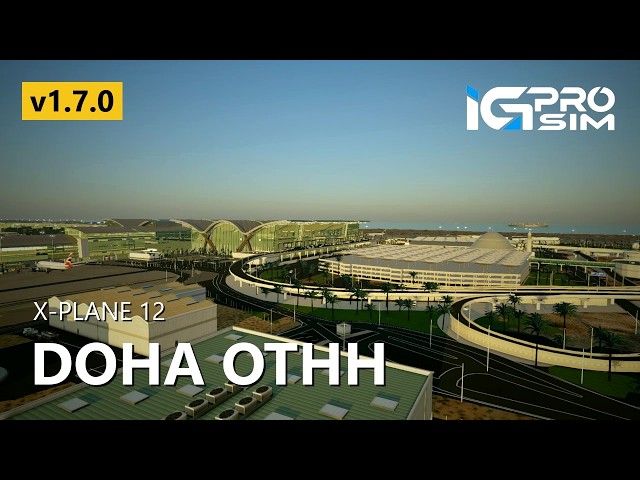
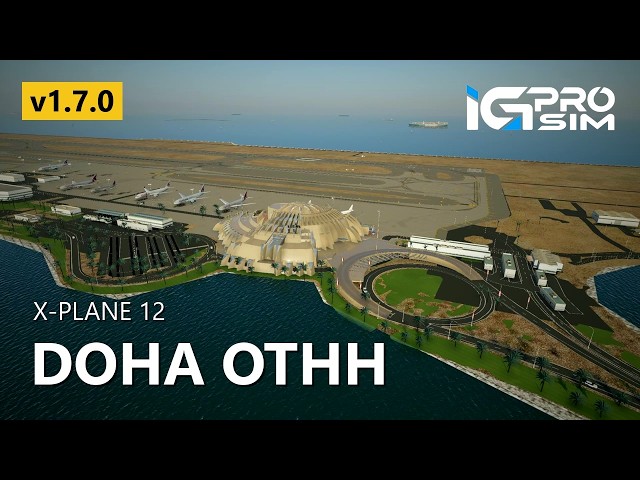
Doha Hamad International Airport (OTHH) for X-Plane 12 – built from real photos and video: the full terminal and concourses A to E, our own jetways, moving traffic and people, worn aprons and full night lighting. Light on your PC: tested on a 6 GB graphics card.
Version 1.7.0 – all updates are free for owners, through the IG PRO SIM Hub.
New in 1.7.0
- New name: IG PRO SIM. The airport uses the IG PRO SIM Airport Library v1.7
- The small settings plugin inside the airport is gone. The IG PRO SIM add-on takes over
- Runway ends moved to the official threshold positions; runway markings, rubber and PAPI moved with them
- Stands 551-564 (GA apron) and V10L (Apron V) carry their official names; two non-existent Apron V stands removed
- Red jet-bridge safety zones now use the shared IG PRO SIM library markings (hatched area with a red-and-white edge line); zones were added where they were missing
- Jetways checked against X-Plane's rules: all park inside their size range and keep a safe distance from the aircraft
- The wrong double line on most of the Road 1 central island is gone
- Smaller download: work files are no longer in the package
Features
- Complete terminal: departure hall with its wave roof, concourses A to E, the Orchard hub, gate blocks and the departures deck with its arched canopies
- Our own jetways, matched to the real stands
- 260+ support buildings modelled by us on their real footprints: cargo, hangars, fire station, utilities, offices, mosque, car parks
- Moving traffic on the landside roads and bridges, people on the kerbs, and thousands of parked cars
- Worn aprons: tyre marks, engine soot, oil stains and every stand weathered differently
- Night lighting: apron masts, lit bridges and entrance roads, car parks, hangars, LED-lit departures canopy
- Traffic and people setting: Off / Low / Medium / High, so it runs on your machine
- Free with this airport (IG PRO SIM add-ons, installed by the Hub): Follow-Me car, airport crowds and service traffic, apron bus at remote stands, airport ambience sound. Docking guidance (VDGS) units are shown at the stands; guidance itself: coming soon.
- All buildings, jetways, landside cars and people are our own work. No third-party objects.
AI aircraft traffic shown in the pictures and videos is a separate third-party add-on and is not included.
Delivery and updates
Every copy is prepared individually for its owner. Your serial number comes with your simMarket order.
Windows: install the free IG PRO SIM Hub app from the Microsoft Store (apps.microsoft.com/detail/9NBK70TXSQVR), open it, enter your serial, click Activate, choose your X-Plane 12 folder and click Install. IG PRO SIM Hub installs the airport, the IG PRO SIM Airport Library and the IG PRO SIM add-ons, and keeps them updated.
Mac or Linux: get IG PRO SIM Hub for Mac or Linux (free) from www.igprosim.com/hub (Linux how-to: www.igprosim.com/hub-linux) and enter your serial the same way.
Already own Doha from simMarket? The free 1.7.0 update comes through the IG PRO SIM Hub with your serial: www.igprosim.com/moving-to-hub
If something doesn't work, email support@igprosim.com with your serial and we'll help you.
Trailer: https://youtu.be/5MR-vAR5GYQ
Full tour, day to night: https://youtu.be/GDAptmGZI64
Short: https://youtube.com/shorts/Dpucd9_SocI
Support: support@igprosim.com – www.igprosim.com
X-Plane is a trademark of Laminar Research. IG PRO SIM is not affiliated with any airport or airline.
Tags
Requirements
X-Plane 12 (latest version)
Windows, macOS or Linux, through the free IG PRO SIM Hub app
6 GB VRAM or more (tested on a GTX 1660 SUPER 6 GB)
IG PRO SIM Airport Library v1.7 (free, same serial; installed by the IG PRO SIM Hub)
Recommended Products

14.49
€ 10.14
$
USD 15.90
All sales based on Euro. Other currencies shown as reference only.£
GBP 12.14
All sales based on Euro. Other currencies shown as reference only.¥
CNY 105.92
All sales based on Euro. Other currencies shown as reference only.
-30%
30-day price low:
€
14.49

€ 19.99
$
USD 21.94
All sales based on Euro. Other currencies shown as reference only.£
GBP 16.74
All sales based on Euro. Other currencies shown as reference only.¥
CNY 146.12
All sales based on Euro. Other currencies shown as reference only.
€ 9.50
$
USD 10.43
All sales based on Euro. Other currencies shown as reference only.£
GBP 7.96
All sales based on Euro. Other currencies shown as reference only.¥
CNY 69.44
All sales based on Euro. Other currencies shown as reference only.
€ 12.56
$
USD 13.78
All sales based on Euro. Other currencies shown as reference only.£
GBP 10.52
All sales based on Euro. Other currencies shown as reference only.¥
CNY 91.81
All sales based on Euro. Other currencies shown as reference only.
19.90
€ 15.90
$
USD 21.84
All sales based on Euro. Other currencies shown as reference only.£
GBP 16.67
All sales based on Euro. Other currencies shown as reference only.¥
CNY 145.46
All sales based on Euro. Other currencies shown as reference only.
-20%
30-day price low:
€
19.90

23.97
€ 17.26
$
USD 26.31
All sales based on Euro. Other currencies shown as reference only.£
GBP 20.08
All sales based on Euro. Other currencies shown as reference only.¥
CNY 175.21
All sales based on Euro. Other currencies shown as reference only.
-28%
30-day price low:
€
23.97

€ 11.00
$
USD 12.07
All sales based on Euro. Other currencies shown as reference only.£
GBP 9.21
All sales based on Euro. Other currencies shown as reference only.¥
CNY 80.41
All sales based on Euro. Other currencies shown as reference only.
€ 34.99
$
USD 38.40
All sales based on Euro. Other currencies shown as reference only.£
GBP 29.31
All sales based on Euro. Other currencies shown as reference only.¥
CNY 255.76
All sales based on Euro. Other currencies shown as reference only.