




Details
✈️ Overview
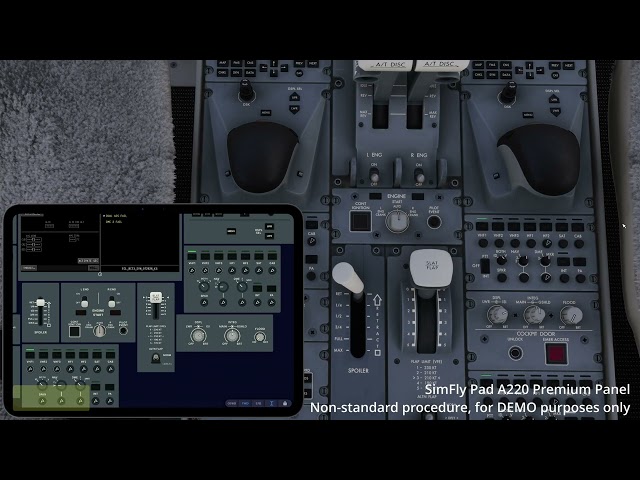
The SimFly Pad A220 Premium Panel is an advanced panel within the SimFly Pad Cockpit Controls feature.
It allows you to control aircraft systems directly from your devices(iOS/Android/Windows), while also streaming real-time cockpit displays from your Microsoft Flight Simulator (MSFS).
Supported aircraft may vary depending on the simulator and add-on. Please refer to the Supported Add-ons section below for detailed compatibility.
⚡Key Features
-
Full Airbus A220 cockpit interaction:
-
Complete Overhead panel (Electrical, Hydraulics, Fuel, Air, Fire, Lighting and more)
-
Full Forward & Pedestal: FCP, both CTPs, dual MKP/CCP keypads with live scratchpad display, three ACP audio panels
-
Spoiler, Flap, Trim, Parking Brake, Landing Gear & ISI, Engine panel, and cockpit lighting controls
-
-
Stream all five flight displays (DU1-DU5) and the EFB to your device, including the MSFS 2024 in-sim EFB pane
-
True bidirectional synchronization - every button reflects the real aircraft state in real time
-
Monitor and control 600+ aircraft variables
-
Covers the vast majority of real SOP procedures
✅ Platform Support
SimFly Pad is available on:
-
iOS (iOS 16 or later)
-
Android (Android 8 or later)
-
Windows (22h2)
✅ Multi-Device Support
SimFly Pad supports multiple devices connected at the same time. Use several tablets/phones together, mix platforms (iOS / Android / Windows) - simply log in with the same account and build your own multi-screen cockpit setup.
⚡ Cockpit Controls (Wireless & Low Latency)
-
No cables required — fully wireless over LAN
-
Typically 10-20 ms latenc
-
Minimal performance impact on simulator FPS
-
No additional configuration or file setup required
-
Operation logic similar to real hardware panels
✈️ Supported Add-ons
-
Synaptic A220 (MSFS 2024 Version)
-
MSFS 2020 and other A220 add-ons are NOT supported.
⚠️ Known Issues
-
[Synaptic A220] Some buttons (REVERSION panel, ACP channel selection keys, EXT PWR, etc.) may not respond or may need repeated presses when operated from SimFly Pad.
-
[Synaptic A220] The display appears blurrier when non-DX12 streaming is used.
-
[Synaptic A220] The FCP speed window cannot switch to MACH indication.
All versions of the SimFly Pad now support 3 free 15-minute sessions per day, so you can fully test it out before purchasing.
⚡ Activation
This product is activated using an activation code.
-
Each activation code can be used only once
-
After activation, the license will be permanently bound to your SimFly Pad account
-
Once activated, you can use it on multiple devices by logging in with the same account
To activate your product, please refer to the official guide:
https://docs.simflypad.com/v1/getting-started/activate-premium-panels
If you encounter any issues during activation, feel free to contact support with screenshots for assistance.
Support & Links
-
Product Page: https://secure.simmarket.com/seeingskyinc.mhtml
-
Docs: https://docs.simflypad.com/
-
Download Sites: https://static.simflypad.com/index.html
-
Email: support@seeingsky.com
-
Discord: https://discord.gg/cU3U6gtX7x
-
YouTube: https://www.youtube.com/@ethantoken
Tags
Requirements
iOS device(iOS System Version >= 16.0) or Android device(Android System Version >= 7.0) or Windows ( Win10 22H2/ Win11)
SimFly Pad (can be downloaded from AppStore or Google Play Store or https://static.simflypad.com/index.html)
MSFS2024
SimFly Linker(runs on PC, included in this product)
Recommended Products

€ 15.50
$
USD 18.13
All sales based on Euro. Other currencies shown as reference only.£
GBP 13.28
All sales based on Euro. Other currencies shown as reference only.¥
CNY 121.87
All sales based on Euro. Other currencies shown as reference only.
€ 13.99
$
USD 16.37
All sales based on Euro. Other currencies shown as reference only.£
GBP 11.99
All sales based on Euro. Other currencies shown as reference only.¥
CNY 109.99
All sales based on Euro. Other currencies shown as reference only.
8.99
€ 6.29
$
USD 10.52
All sales based on Euro. Other currencies shown as reference only.£
GBP 7.70
All sales based on Euro. Other currencies shown as reference only.¥
CNY 70.68
All sales based on Euro. Other currencies shown as reference only.
-30%
30-day price low:
€
8.99

€ 17.99
$
USD 21.05
All sales based on Euro. Other currencies shown as reference only.£
GBP 15.41
All sales based on Euro. Other currencies shown as reference only.¥
CNY 141.44
All sales based on Euro. Other currencies shown as reference only.
€ 6.50
$
USD 7.60
All sales based on Euro. Other currencies shown as reference only.£
GBP 5.57
All sales based on Euro. Other currencies shown as reference only.¥
CNY 51.11
All sales based on Euro. Other currencies shown as reference only.
€ 12.00
$
USD 14.04
All sales based on Euro. Other currencies shown as reference only.£
GBP 10.28
All sales based on Euro. Other currencies shown as reference only.¥
CNY 94.35
All sales based on Euro. Other currencies shown as reference only.
€ 9.00
$
USD 10.53
All sales based on Euro. Other currencies shown as reference only.£
GBP 7.71
All sales based on Euro. Other currencies shown as reference only.¥
CNY 70.76
All sales based on Euro. Other currencies shown as reference only.
€ 20.00
$
USD 23.40
All sales based on Euro. Other currencies shown as reference only.£
GBP 17.13
All sales based on Euro. Other currencies shown as reference only.¥
CNY 157.25
All sales based on Euro. Other currencies shown as reference only.