




Details
SkyParot Wingsuit 1.0
for Microsoft Flight Simulator 2024
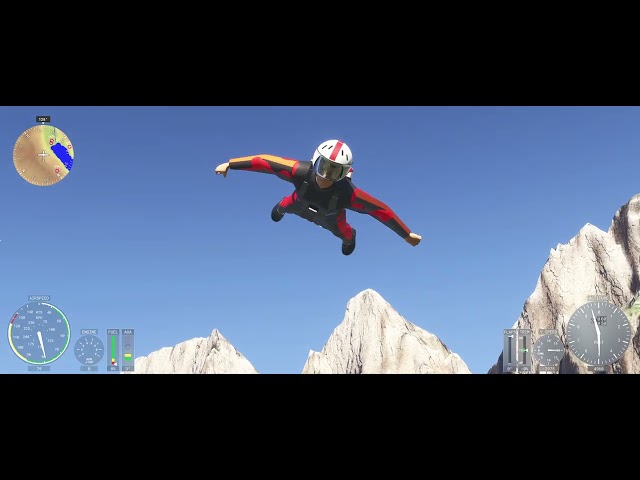
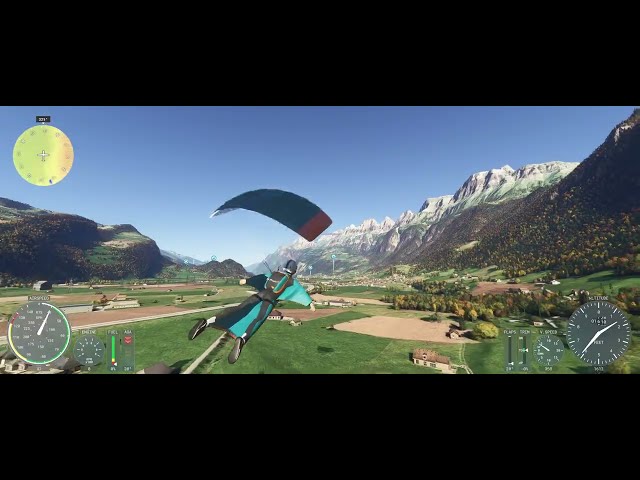
Walk to the edge, jump and fly. The SkyParot Wingsuit takes you through a complete wingsuit jump: exit from the cliff, a fast proximity-style flight along the terrain, then deploying your parachute and landing it like a paraglider.
The full jump in four phases
- On the ground and exit. Select Free Flight. Select any point on the map. Place the cursor on a high, steep cliff. Set as departure point. Custom. On the ground – ready for takeoff. Start flight. Walk and turn your pilot with the keyboard or joystick and step over the edge. As soon as the ground is gone, the pilot leaps off and moves into the belly-down flying position.
- Wingsuit flight. Control pitch, roll and yaw with your stick and pedals.
- The arm and leg wings start to inflate at around 18 kt and are fully pressurised from 40 kt.
- Trade height for speed, or flatten out and stretch your glide.
- Parachute deployment. Deploy with one button or a lever axis. Assign a button or "G" to "fully extend the flaps". The canopy leaves the container and opens with a smooth opening shock.
- Canopy flight and landing. Under the canopy the wingsuit switches to its own parachute flight model.
- The brakes slow you down, one-sided brake turns you, and the wing swings naturally in turns.
- Wind and thermals carry you.
- Flare just above the ground for a soft landing on your feet.
Features
- Two variants: male and female pilot, both fully modelled with suit, container and harness.
- Pilot animations for standing, walking, flying and hanging under the canopy with hands on the toggles.
- Helmet HUD in the cockpit and VR view:
- heading
- ground speed
- altitude above sea level and above ground
- vario
- current glide ratio
- flight status
- First-person view at the pilot's eyes, with a clear view down and back.
- Simple setup: standard MSFS axes for elevator, ailerons and rudder; gear toggle or flaps axis to deploy canopy.
- Manual in English with a control reference for every phase and a troubleshooting guide.
Requirements
- Microsoft Flight Simulator 2024.
- A joystick or HOTAS is recommended; pedals or a twist axis are optional.
Stichworte
Hinweis
Dieses Produkt verfügt über unsere simInstaller Technologie und ist nach dem Kauf nur über unsere APP verfügbar.
Anforderungen
MSFS 2024
Joystick recommended
Empfohlene Produkte

€ 18.00
$
USD 20.20
Alle Verkäufe in Euro. Andere Währungen werden nur als Referenz angezeigt.£
GBP 15.31
Alle Verkäufe in Euro. Andere Währungen werden nur als Referenz angezeigt.¥
CNY 135.47
Alle Verkäufe in Euro. Andere Währungen werden nur als Referenz angezeigt.
€ 33.18
$
USD 37.24
Alle Verkäufe in Euro. Andere Währungen werden nur als Referenz angezeigt.£
GBP 28.21
Alle Verkäufe in Euro. Andere Währungen werden nur als Referenz angezeigt.¥
CNY 249.71
Alle Verkäufe in Euro. Andere Währungen werden nur als Referenz angezeigt.
€ 5.00
$
USD 5.61
Alle Verkäufe in Euro. Andere Währungen werden nur als Referenz angezeigt.£
GBP 4.25
Alle Verkäufe in Euro. Andere Währungen werden nur als Referenz angezeigt.¥
CNY 37.63
Alle Verkäufe in Euro. Andere Währungen werden nur als Referenz angezeigt.
€ 16.99
$
USD 19.07
Alle Verkäufe in Euro. Andere Währungen werden nur als Referenz angezeigt.£
GBP 14.45
Alle Verkäufe in Euro. Andere Währungen werden nur als Referenz angezeigt.¥
CNY 127.87
Alle Verkäufe in Euro. Andere Währungen werden nur als Referenz angezeigt.
€ 16.95
$
USD 19.03
Alle Verkäufe in Euro. Andere Währungen werden nur als Referenz angezeigt.£
GBP 14.41
Alle Verkäufe in Euro. Andere Währungen werden nur als Referenz angezeigt.¥
CNY 127.56
Alle Verkäufe in Euro. Andere Währungen werden nur als Referenz angezeigt.
€ 12.99
$
USD 14.58
Alle Verkäufe in Euro. Andere Währungen werden nur als Referenz angezeigt.£
GBP 11.05
Alle Verkäufe in Euro. Andere Währungen werden nur als Referenz angezeigt.¥
CNY 97.76
Alle Verkäufe in Euro. Andere Währungen werden nur als Referenz angezeigt.
€ 6.89
$
USD 7.73
Alle Verkäufe in Euro. Andere Währungen werden nur als Referenz angezeigt.£
GBP 5.86
Alle Verkäufe in Euro. Andere Währungen werden nur als Referenz angezeigt.¥
CNY 51.85
Alle Verkäufe in Euro. Andere Währungen werden nur als Referenz angezeigt.
€ 26.49
$
USD 29.74
Alle Verkäufe in Euro. Andere Währungen werden nur als Referenz angezeigt.£
GBP 22.53
Alle Verkäufe in Euro. Andere Währungen werden nur als Referenz angezeigt.¥
CNY 199.36
Alle Verkäufe in Euro. Andere Währungen werden nur als Referenz angezeigt.