




Details
CityGlow V1 for X-Plane 12
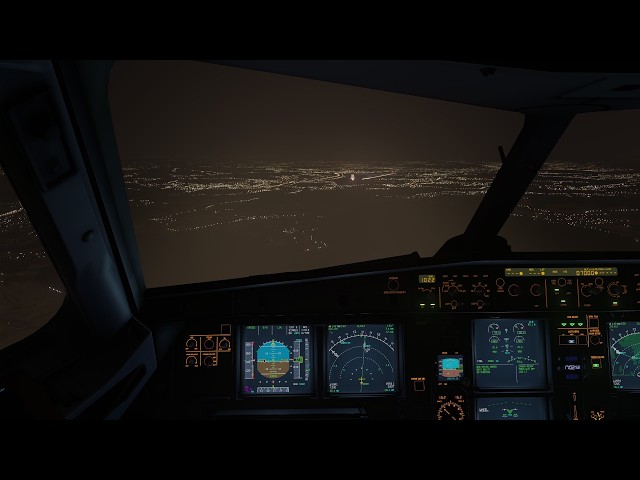
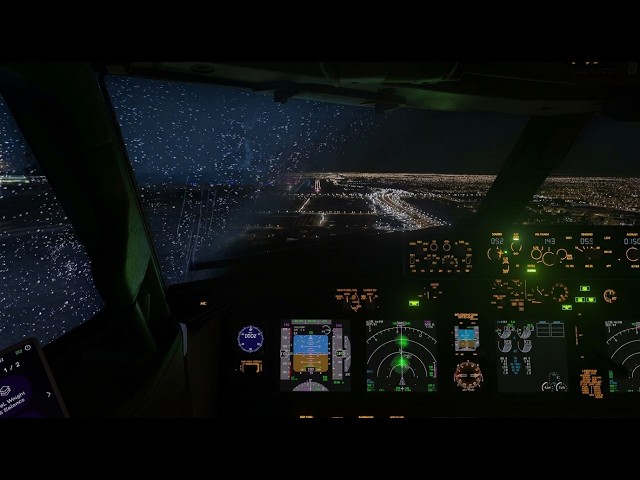
CityGlow is a visual add-on for X-Plane 12 that brings city lighting into the atmosphere. At night, the lights below cast a glow into low clouds and haze. On a foggy approach, your aircraft’s landing lights illuminate moisture ahead. Version 1 also includes optional aircraft-specific rain effects for cockpit and cabin windows.
What CityGlow does
City glow and atmospheric haze. City lights illuminate low clouds and scatter through haze. The effect responds to daylight, visibility, fog and rain, so a clear night and a low overcast produce different results. In Plugins → CityGlow Native, use Glow Colour to choose a preset or set a custom RGB colour. Use Glow Strength to adjust haze and cloud illumination independently from 0% to 200%. Your settings are saved between flights, and Restore Defaults returns both strengths to 100%.
Longer-range street lighting. CityGlow extends the visible street-light network using your installed scenery. Roads and neighbourhoods remain recognisable farther into the distance. Coverage follows the scenery regions you have installed, and CityGlow detects newly installed regions on a normal X-Plane start.
Aircraft lights in clouds and fog. Supported landing, taxi, runway turnoff, navigation, beacon and strobe lights interact with nearby moisture. The effect follows the aircraft’s light positions, directions and flash patterns where supported. Forward beams can illuminate nearby cloud as you approach it, and the effect remains visible in dense cloud during the day with less contrast than at night.
Optional cockpit and cabin window rain. Droplets, water trails and wet film respond to airspeed and aircraft movement. Wipers clear the windshields, and fresh droplets gradually build up again as the aircraft slows to taxi speed. The included rain effects are visual only. Therefore, the sounds come from either default XP or 3rd-party add-ons.
What’s included in V1
- CityGlow Native with city haze, cloud illumination, extended street lighting and aircraft-light effects.
- Windows setup and uninstaller. Setup detects Steam and standalone installations and lets you browse to a custom X-Plane folder.
- Rain Effects setup and uninstaller. Choose which supported aircraft receive the window rain. Setup backs up the aircraft files it changes so the uninstaller can restore them.
- Installation guides and two settings screenshots showing the CityGlow and ITC settings used for the previews.
- Rain effects work with; ToLiss A320 CEO, ToLiss A320neo, ToLiss A321, ToLiss A330-900, All LevelUp 737NG Series V2 aircrafts and Zibo 737-800
Frequently asked questions
What is the FPS cost?
Expect roughly 6 FPS lower with CityGlow enabled. The cost varies with your GPU and resolution. (My PC specs are: RTX 3070, 64GB RAM, R9 9950X, 2K resolution)
Do I need a lighting mod?
CityGlow works with X-Plane’s default lighting. For the look shown in the previews, install ITC Light Mod v4.7.8 with its Optional Lights files and match the included screenshots. Bay’s Lighting Mod is also an option on its own or alongside the ITC plugin. When two mods replace the same lighting files, the last installed copy takes effect.
Can I use AutoOrtho, Ortho4XP or X-Plane Map Enhancement?
Yes. CityGlow’s effects can be used alongside satellite scenery. Distant ground can still appear black where the scenery lacks night textures, even while street lamps and atmospheric glow remain visible. Map Enhancement users can enable night textures with the Pro version. For AutoOrtho and Ortho4XP, night texture coverage depends on the scenery you use.
Does it work with Sim Heaven?
Yes. All my testing was using Sim Heaven.
标签
使用需求
Operating system: Windows 10 or 11, 64-bit, on an x64 PC
Simulator: X-Plane 12.4.3 or later, Steam or standalone. Compatibility can vary with new simulator betas. I test the update and prepare a patch if needed.
Graphics: A Vulkan 1.3-capable GPU supported by X-Plane 12, with its graphics driver installed
Windows runtimes: Microsoft .NET Framework 4.8 and Visual C++ v14 x64. Setup can download and install missing components.
Storage: Approximately 207 MB download, plus space to extract the package and store locally prepared scenery and shader files; 12 GB would be enough
推荐商品

€ 18.95
$
USD 21.35
所有商品的售价基准为欧元,其他货币价格仅供参考!£
GBP 15.82
所有商品的售价基准为欧元,其他货币价格仅供参考!¥
CNY 142.46
所有商品的售价基准为欧元,其他货币价格仅供参考!
€ 12.95
$
USD 14.59
所有商品的售价基准为欧元,其他货币价格仅供参考!£
GBP 10.81
所有商品的售价基准为欧元,其他货币价格仅供参考!¥
CNY 97.35
所有商品的售价基准为欧元,其他货币价格仅供参考!
17.49
€ 13.99
$
USD 19.71
所有商品的售价基准为欧元,其他货币价格仅供参考!£
GBP 14.60
所有商品的售价基准为欧元,其他货币价格仅供参考!¥
CNY 131.48
所有商品的售价基准为欧元,其他货币价格仅供参考!
-20%
30 天最低价:
€
17.49

€ 12.21
$
USD 13.76
所有商品的售价基准为欧元,其他货币价格仅供参考!£
GBP 10.19
所有商品的售价基准为欧元,其他货币价格仅供参考!¥
CNY 91.79
所有商品的售价基准为欧元,其他货币价格仅供参考!
€ 6.50
$
USD 7.32
所有商品的售价基准为欧元,其他货币价格仅供参考!£
GBP 5.42
所有商品的售价基准为欧元,其他货币价格仅供参考!¥
CNY 48.87
所有商品的售价基准为欧元,其他货币价格仅供参考!
€ 7.99
$
USD 9.00
所有商品的售价基准为欧元,其他货币价格仅供参考!£
GBP 6.67
所有商品的售价基准为欧元,其他货币价格仅供参考!¥
CNY 60.07
所有商品的售价基准为欧元,其他货币价格仅供参考!
€ 24.29
$
USD 27.37
所有商品的售价基准为欧元,其他货币价格仅供参考!£
GBP 20.27
所有商品的售价基准为欧元,其他货币价格仅供参考!¥
CNY 182.60
所有商品的售价基准为欧元,其他货币价格仅供参考!
€ 10.00
$
USD 11.27
所有商品的售价基准为欧元,其他货币价格仅供参考!£
GBP 8.35
所有商品的售价基准为欧元,其他货币价格仅供参考!¥
CNY 75.18
所有商品的售价基准为欧元,其他货币价格仅供参考!