




Details
GFlight Camera for Microsoft Flight Simulator 2024
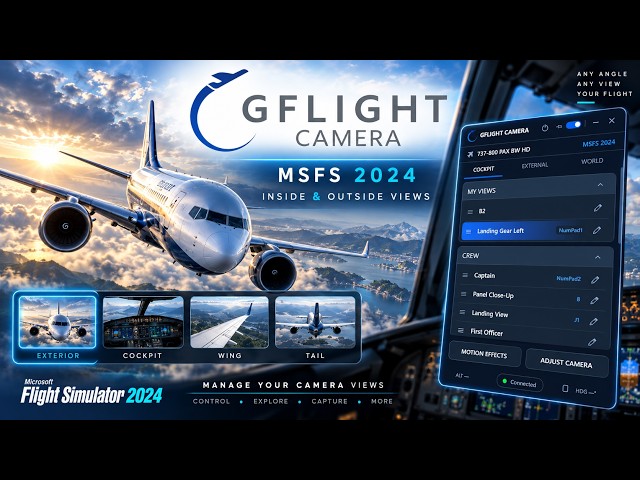
GFlight Camera is a dedicated camera management solution for Microsoft Flight Simulator 2024, designed to make cockpit and external camera control faster, simpler and more organized.
Create unlimited camera presets, keep a separate profile for each aircraft, and recall your favorite views instantly from the app, your keyboard, or buttons on your joystick and yoke. GFlight Camera detects the loaded aircraft automatically and switches to its profile, so there is nothing to select or configure when you change aircraft.
Each aircraft starts with its own empty camera profile, allowing you to build a personalized collection of views without unnecessary preloaded presets.
Both Inside and Outside views are managed from a single window, including camera position, viewing direction, zoom/FOV and movement sensitivity. Presets can be recalled instantly or with smooth automatic transitions.
6DOF Keyboard Control
-
Move the camera forward/backward, left/right and up/down, while controlling yaw, pitch and roll directly from your keyboard.
-
Movement continues smoothly for as long as the key is held.
-
Forward/backward and left/right movement follow your current camera viewing direction, providing more intuitive navigation regardless of where the aircraft is pointing.
-
Camera pitch does not affect horizontal movement; vertical positioning is controlled independently.
-
Default keys use the Shift modifier (Shift + W/A/S/D/R/F/Q/E and Shift + Arrow Keys) to avoid conflicts with MSFS shortcuts.
-
All bindings can be customized from the Profile page, with automatic conflict detection. Keyboard control can be toggled on or off at any time from the KEY NUDGE indicator on the bottom bar.
View-Relative Camera Navigation
The ADJUST CAMERA (NAV) screen provides intuitive camera positioning through its 2D navigation pad.
-
Move forward in the direction your camera is currently facing, rather than toward the aircraft's nose.
-
Left and right navigation automatically follow your camera's viewing direction.
-
Looking up or down does not affect horizontal movement.
-
Adjust camera altitude independently using the VERTICAL control.
-
Keyboard movement (W/A/S/D) follows the same navigation logic as the 2D pad.
This makes fine-tuning cockpit and external camera positions more consistent and predictable.
GCAM ↔ NATIVE FREE
-
Hand camera control back to MSFS with a single click and use the simulator's native right-click free-look.
-
Assign a keyboard key and/or a joystick button to switch between GCAM and NATIVE FREE without touching the mouse.
-
When you find a view you like, save it as a named preset instantly with SAVE CURRENT VIEW.
-
Switch back to GCAM and GFlight Camera takes over again with all your settings preserved.
KEY FEATURES
-
Designed specifically for Microsoft Flight Simulator 2024
-
Inside and Outside camera management
-
Automatic aircraft detection with per-aircraft camera profiles
-
Unlimited user-created camera presets
-
Automatic creation of an empty profile for each aircraft
-
Rename, reorder and delete presets
-
Full 6DOF keyboard control with customizable bindings and conflict detection
-
View-relative camera movement using the 2D navigation pad and keyboard
-
Independent vertical camera positioning
-
GCAM ↔ NATIVE FREE switching with MSFS native free-look support
-
Keyboard and joystick hotkey for switching to NATIVE FREE
-
One-click saving of free-look views as presets
-
Keyboard, joystick and yoke assignments for camera views
-
Smooth automatic transitions between presets
-
Position, direction, zoom/FOV and sensitivity controls
-
Profile page for account, hotkeys and keyboard control settings
-
Automatic connection to MSFS 2024
-
Preservation of saved presets and settings during updates
-
No third-party software required
WHAT'S NEW IN VERSION 0.2.2
New: View-Relative Camera Navigation
The 2D navigation pad on the ADJUST CAMERA (NAV) screen now moves the camera relative to its current viewing direction rather than the aircraft's heading.
-
Forward/backward and left/right navigation automatically adapt to the camera's viewing direction.
-
Camera pitch does not affect horizontal movement, while altitude remains independently controlled through the VERTICAL channel.
-
Keyboard movement (W/A/S/D) now follows the same navigation logic as the 2D pad.
Improved: Cleaner Aircraft Profile Management
-
New installations no longer include pre-made aircraft camera profiles.
-
An empty aircraft-specific profile is automatically created when an aircraft is selected.
-
Only your own saved camera views appear in each aircraft's preset list.
-
The installer automatically removes obsolete pre-made profile files from older versions.
-
Existing user-created presets, learned camera positions and application settings are preserved without requiring any action.
Fixed: Camera Preset Loading
-
Resolved an issue introduced by a recent MSFS 2024 update that prevented presets from loading correctly for certain aircraft.
-
Preset lists now display completely for affected aircraft.
PREVIOUS UPDATE — VERSION 0.2.1
-
Added keyboard and joystick hotkeys for GCAM ↔ NATIVE FREE switching.
-
Introduced a Profile page with account, hotkey and keyboard control settings.
-
Expanded the zoom-out range down to 0.25x.
-
Added progress indicators for sign in, account creation and sign out.
-
Added tooltips for presets and SIM mode.
-
Reduced background network activity.
AIRCRAFT COMPATIBILITY
-
GFlight Camera works with most MSFS 2024 aircraft.
-
Functionality may vary with certain aircraft or third-party add-ons due to differences in camera implementation.
EARLY ACCESS
-
GFlight Camera is in Early Access and under active development.
-
The core camera management features are already available, while further MSFS 2024 native camera integration is planned.
-
WORLD camera functionality is not currently available and is planned for a future release.
-
All future updates, including major version upgrades, are free for existing customers.
LICENSE, UPDATES & SUPPORT
-
A license key is entered once and verified automatically on each launch.
-
The license may be used by the purchaser on multiple personally owned computers, with one active session at a time.
-
Licenses are personal and non-transferable.
-
An active internet connection is required while using GFlight Camera.
-
Automatic in-app updates are not currently supported. Updates must be downloaded and installed manually through the provided distribution channel.
-
Installing an update preserves your existing user-created camera presets, learned camera positions and application settings.
-
Support is available via e-mail at support@gflight.com.tr and through the SimMarket support system.
Current Version: 0.2.2
Tags
Requirements
MINIMUM REQUIREMENTS
OS: Windows 10 64-bit or Windows 11 64-bit
Simulator: Microsoft Flight Simulator 2024
Hardware: A PC capable of running Microsoft Flight Simulator 2024
Internet: Active internet connection required for license verification and application use
Input: Keyboard and mouse
Controllers: Joystick and yoke support optional
Software: No additional third-party camera software required
ADDITIONAL NOTES
GFlight Camera runs alongside Microsoft Flight Simulator 2024 as a separate Windows application.
Joystick and yoke buttons can be assigned to camera views and presets.
Internet access must be allowed through Windows Firewall or other security software for license verification.
Microsoft Flight Simulator 2020 is not currently supported yet.
Customers who bought this product also purchased

€ 11.80
$
USD 13.17
All sales based on Euro. Other currencies shown as reference only.£
GBP 9.84
All sales based on Euro. Other currencies shown as reference only.¥
CNY 87.89
All sales based on Euro. Other currencies shown as reference only.
€ 18.50
$
USD 20.66
All sales based on Euro. Other currencies shown as reference only.£
GBP 15.43
All sales based on Euro. Other currencies shown as reference only.¥
CNY 137.80
All sales based on Euro. Other currencies shown as reference only.
€ 29.39
$
USD 32.81
All sales based on Euro. Other currencies shown as reference only.£
GBP 24.52
All sales based on Euro. Other currencies shown as reference only.¥
CNY 218.91
All sales based on Euro. Other currencies shown as reference only.
€ 22.99
$
USD 25.67
All sales based on Euro. Other currencies shown as reference only.£
GBP 19.18
All sales based on Euro. Other currencies shown as reference only.¥
CNY 171.24
All sales based on Euro. Other currencies shown as reference only.
€ 17.99
$
USD 20.09
All sales based on Euro. Other currencies shown as reference only.£
GBP 15.01
All sales based on Euro. Other currencies shown as reference only.¥
CNY 134.00
All sales based on Euro. Other currencies shown as reference only.
€ 24.00
$
USD 26.80
All sales based on Euro. Other currencies shown as reference only.£
GBP 20.02
All sales based on Euro. Other currencies shown as reference only.¥
CNY 178.76
All sales based on Euro. Other currencies shown as reference only.
€ 14.99
$
USD 16.74
All sales based on Euro. Other currencies shown as reference only.£
GBP 12.50
All sales based on Euro. Other currencies shown as reference only.¥
CNY 111.65
All sales based on Euro. Other currencies shown as reference only.
€ 6.95
$
USD 7.76
All sales based on Euro. Other currencies shown as reference only.£
GBP 5.80
All sales based on Euro. Other currencies shown as reference only.¥
CNY 51.77
All sales based on Euro. Other currencies shown as reference only.