




Details
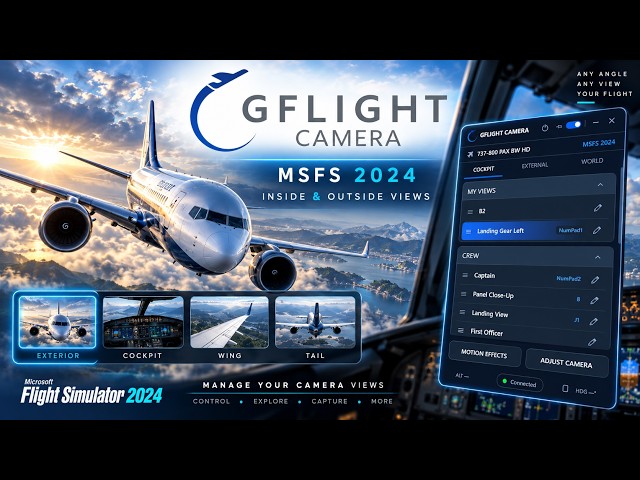
GFlight Camera is a dedicated camera management solution for Microsoft Flight Simulator 2024, designed to make cockpit and external camera control simpler, faster and more organized.
Create unlimited custom camera presets, manage separate camera profiles for each aircraft, and access your favorite views instantly using mouse controls, keyboard shortcuts or buttons assigned to your joystick and yoke.
GFlight Camera automatically detects the aircraft currently loaded in MSFS 2024 and loads its corresponding camera profile, eliminating the need to manually select or configure profiles every time you change aircraft.
Both Inside and Outside camera views can be managed from a single application. Camera position, viewing direction, zoom/FOV and movement sensitivity can be controlled directly from GFlight Camera.
Camera presets can be named, reordered, renamed and deleted. Each aircraft can have its own independent preset library, while built-in ready-to-use camera presets provide quick access to commonly used views.
Preset changes can be performed instantly or with automatic smooth camera transitions, providing more natural movement between different camera positions.
Keyboard and joystick/yoke assignments allow frequently used views to be recalled without returning to the application interface, making camera management faster during flight.
GFlight Camera connects automatically when Microsoft Flight Simulator 2024 is already running. If GFlight Camera is started before the simulator, simply use the Reconnect function after MSFS 2024 has started.
No additional third-party software required.
KEY FEATURES
- Designed specifically for Microsoft Flight Simulator 2024
- Inside and Outside camera management
- Automatic aircraft detection
- Individual camera profiles for each aircraft
- Unlimited custom camera presets
- Ready-to-use camera presets
- Rename, reorder and manage custom presets
- Keyboard shortcut assignment for individual camera views
- Joystick and yoke button assignment
- Automatic smooth transitions between camera presets
- Camera position, viewing direction, zoom/FOV and movement sensitivity controls
- Single-window camera management interface
AIRCRAFT COMPATIBILITY
GFlight Camera is designed to work with most aircraft available for Microsoft Flight Simulator 2024.
Due to differences in aircraft development and camera implementation, functionality may vary with certain aircraft or third-party add-ons.
EARLY ACCESS
GFlight Camera is currently available in Early Access and is under active development.
The application already provides its core Inside/Outside camera management, aircraft profile, custom preset and controller assignment functionality, while additional capabilities are continuing to be developed.
Current Early Access development includes further integration with some of MSFS 2024's native camera controls.
WORLD camera functionality is not currently available and is planned as part of future development.
Future updates, including bug fixes, additional aircraft compatibility, new features and major version upgrades, will be provided free of charge to existing customers.
SYSTEM REQUIREMENTS
- Windows 10 64-bit
- Windows 11 64-bit
- Microsoft Flight Simulator 2024
- Active Internet Connection
LICENSE
A license key is entered once during initial activation and is automatically verified on subsequent application launches.
The same license may be used by the purchaser on multiple personally owned computers; however, only one active session may be used at a time.
Licenses are personal and may not be transferred to another user.
An active internet connection is required while using GFlight Camera.
UPDATES & SUPPORT
Current versions and updates are downloaded manually through the provided distribution channel.
Customer support is available via e-mail and the SimMarket support system.
CLOSING TEXT
Take control of your MSFS 2024 camera experience with GFlight Camera — a focused and accessible camera management solution designed to make managing your views faster, simpler and more intuitive.
标签
使用需求
Windows 10 64-bit
Windows 11 64-bit
Microsoft Flight Simulator 2024
Active Internet Connection
推荐商品

€ 12.00
$
USD 13.78
所有商品的售价基准为欧元,其他货币价格仅供参考!£
GBP 10.30
所有商品的售价基准为欧元,其他货币价格仅供参考!¥
CNY 92.41
所有商品的售价基准为欧元,其他货币价格仅供参考!
€ 9.90
$
USD 11.37
所有商品的售价基准为欧元,其他货币价格仅供参考!£
GBP 8.50
所有商品的售价基准为欧元,其他货币价格仅供参考!¥
CNY 76.24
所有商品的售价基准为欧元,其他货币价格仅供参考!
€ 14.99
$
USD 17.21
所有商品的售价基准为欧元,其他货币价格仅供参考!£
GBP 12.87
所有商品的售价基准为欧元,其他货币价格仅供参考!¥
CNY 115.44
所有商品的售价基准为欧元,其他货币价格仅供参考!
€ 16.99
$
USD 19.51
所有商品的售价基准为欧元,其他货币价格仅供参考!£
GBP 14.58
所有商品的售价基准为欧元,其他货币价格仅供参考!¥
CNY 130.84
所有商品的售价基准为欧元,其他货币价格仅供参考!
€ 21.99
$
USD 25.25
所有商品的售价基准为欧元,其他货币价格仅供参考!£
GBP 18.87
所有商品的售价基准为欧元,其他货币价格仅供参考!¥
CNY 169.34
所有商品的售价基准为欧元,其他货币价格仅供参考!
€ 13.99
$
USD 16.06
所有商品的售价基准为欧元,其他货币价格仅供参考!£
GBP 12.01
所有商品的售价基准为欧元,其他货币价格仅供参考!¥
CNY 107.74
所有商品的售价基准为欧元,其他货币价格仅供参考!
€ 25.99
$
USD 29.84
所有商品的售价基准为欧元,其他货币价格仅供参考!£
GBP 22.31
所有商品的售价基准为欧元,其他货币价格仅供参考!¥
CNY 200.15
所有商品的售价基准为欧元,其他货币价格仅供参考!
€ 14.99
$
USD 17.21
所有商品的售价基准为欧元,其他货币价格仅供参考!£
GBP 12.87
所有商品的售价基准为欧元,其他货币价格仅供参考!¥
CNY 115.44
所有商品的售价基准为欧元,其他货币价格仅供参考!