




Details
Terminal Approach Control Replay is a radar control simulator built to let you experience the pressure, on-the-spot thinking, and rhythm of a terminal radar controller. Powered by our custom engine, every session runs on historic ADS-B traffic and weather data—giving you the same traffic real controllers faced, including Center metering, STAR shortcuts, weather deviations, runway configuration changes, rush-hour peaks, and quiet spells.
A Fully Staffed Facility Around You
Every facility divides its airspace into distinct positions—each with its own frequency and responsibilities—and the facility is always fully staffed. Take over any approach radar position from Director/Feeder, Final, Departure, or Combined sector while AI controllers actively work every position you leave unstaffed. AI controllers separate, vector, and space traffic, while initiating and responding to handoffs and point-outs just like real neighbouring sector controllers.
Work a single position, combine several, manage the entire facility yourself, or launch a session with no position selected to simply monitor and listen to the fully voiced controllers and pilots operate.
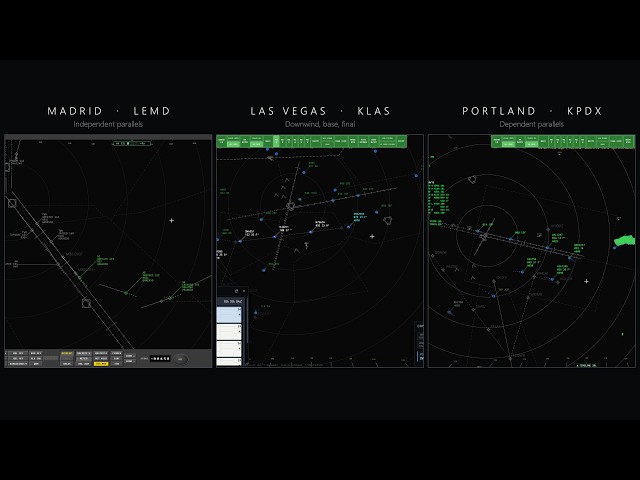
Airports at Launch
-
Las Vegas (KLAS)
-
Portland (KPDX)
-
Mumbai (VABB)
-
Madrid (LEMD)
-
Denver (KDEN) is planned as free addon post-launch.
Realistic Radar Displays
The radar scopes focus on the operational tools a terminal controller relies on most and are not exact replicas:
-
STARS-Style Display (US Airports): Modelled on the FAA system, featuring the Display Control Bar, knob plates, Preview area with implied commands, MULTI FUNC entries, full/partial/limited data blocks, and Quick Look.
-
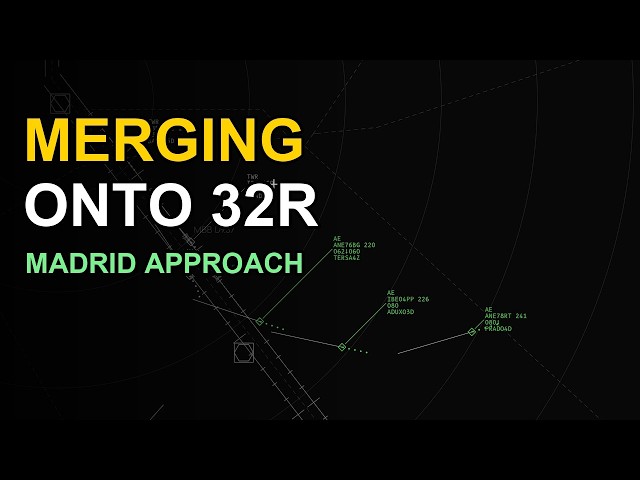
ICAO-Style Situation Display (International Airports): Features the General Information bar, Main Menu, callsign menu, clickable working label fields, and Quick Look.
Controller Tools & Safety Nets
-
Conflict Alerts: Automated conflict alerts (CA / STCA) and a live conflict list.
-
Low-Altitude Alerts: Minimum Safe Altitude Warning (MSAW) alerts.
-
Final-Approach Spacing: ATPA in-trail spacing cones on final.
-
Arrival Management: Advisory arrival slot timing and managers (TSAS on STARS, AMAN on ICAO), included as a helpful guide rather than a strict real-world tool.
-
Separation Predictors: Minimum separation (MIN SEP) and closest-point-of-approach (CPA) predictors.
-
Measurement & Rings: Range rings, J-rings, and range/bearing lines with customizable alarms.
-
Electronic flight strips and comms log.
Real-World Procedures & Aircraft Performance
SIDs, STARs, approaches, and holds are sourced from official aeronautical data. Aircraft follow their recorded routes until you assume control. From there, you can vector them or clear them to fly published procedures as charted—including altitude and speed restrictions, radius-to-fix (RF) arcs, holds, missed approaches, and ILS (with named variants), RNAV/RNP, or visual approaches.
Aircraft follow realistic performance envelopes by type, rolling into turns, observing the 250-knot limit below 10,000 feet, and drifting with recorded winds aloft. Optional realism settings also add pilot reaction delays, abnormal events, and occasional readback errors that you must catch before the pilot flies the wrong clearance. Official airport charts can be downloaded directly inside the simulator for quick reference.
IFR and VFR Traffic
Manage a realistic fleet mix of airliners, cargo flights, and business jets operating into both primary and satellite airports. VFR traffic is also part of the workload—including local training flights, cross-country traffic squawking 1200 or 7000, and pilots requesting flight following, Class B transitions, or practice approaches. VFR traffic can be adjusted or turned off per session, while background helicopter traffic can be toggled on or off separately.
Voice or Keyboard Control
Control traffic by voice, keyboard, or a seamless mix of both. Speech recognition runs locally on your computer with no cloud service required, tuned specifically for FAA and ICAO ATC phraseology, numbers, and callsigns. Pilots and controllers are voiced by a large cast of speakers, including local accents at Spanish and Indian facilities.
Sessions, Briefings & Scoring
-
Flexible Shifts: Choose a timed session from 45 minutes to two hours, or run an unlimited session that rolls seamlessly into the next recorded day.
-
Curated Presets: Jump into ready-made scenarios for each day, from quiet shifts to peak rush hours and challenging weather.
-
Position Relief Briefing: Start every session with a voiced relief briefing that walks you through active runways, weather, and the aircraft currently under your control before the clock starts.
-
Optional Scoring & Logbook: Toggle scoring per session to receive a detailed post-session report, an incident timeline with coaching tips, and a safety-driven grade saved to your logbook.
Learn at Your Own Pace
Whether you are new to radar control or an experienced sim controller, interactive tutorials walk you through the basics step by step. A searchable in-game wiki, a full Controller's Manual, and Keyboard & Voice Quick Reference cards are always on hand to help you master the scopes, commands, and phraseology.
More Info : https://hmisimulations.com/terminal-approach-control-replay https://www.youtube.com/@HMISimulations
标签
使用需求
MINIMUM
OS: Windows 10 or 11, 64-bit
Processor: 4 cores with AVX2 (Intel 8th gen, AMD Ryzen 2000 or newer)
Graphics: Vulkan-compatible graphics card with 4 GB (NVIDIA, AMD or Intel), or recent integrated graphics
Memory: 8 GB (16 GB with integrated graphics)
Storage: 2 GB free
Network: Broadband internet connection (required)
Audio: Microphone optional; every command can also be typed
Account: Free hmisimulations.com account (email or Google sign-in)
RECOMMENDED
OS: Windows 11, 64-bit
Processor: 6 cores or more
Graphics: NVIDIA GeForce RTX 3060, AMD Radeon RX 6600 or better, 6 GB or more
Memory: 16 GB
Storage: SSD
Network: Low-latency connection
Audio: Headset with push-to-talk
Keep your graphics driver up to date: voice recognition runs on the graphics card.
推荐商品

€ 14.00
$
USD 15.31
所有商品的售价基准为欧元,其他货币价格仅供参考!£
GBP 11.71
所有商品的售价基准为欧元,其他货币价格仅供参考!¥
CNY 102.07
所有商品的售价基准为欧元,其他货币价格仅供参考!
€ 12.99
$
USD 14.21
所有商品的售价基准为欧元,其他货币价格仅供参考!£
GBP 10.87
所有商品的售价基准为欧元,其他货币价格仅供参考!¥
CNY 94.70
所有商品的售价基准为欧元,其他货币价格仅供参考!
24.29
€ 19.43
$
USD 26.57
所有商品的售价基准为欧元,其他货币价格仅供参考!£
GBP 20.32
所有商品的售价基准为欧元,其他货币价格仅供参考!¥
CNY 177.09
所有商品的售价基准为欧元,其他货币价格仅供参考!
-20%
30 天最低价:
€
24.29

10.00
€ 7.00
$
USD 10.94
所有商品的售价基准为欧元,其他货币价格仅供参考!£
GBP 8.37
所有商品的售价基准为欧元,其他货币价格仅供参考!¥
CNY 72.91
所有商品的售价基准为欧元,其他货币价格仅供参考!
-30%
30 天最低价:
€
10.00

€ 9.99
$
USD 10.93
所有商品的售价基准为欧元,其他货币价格仅供参考!£
GBP 8.36
所有商品的售价基准为欧元,其他货币价格仅供参考!¥
CNY 72.83
所有商品的售价基准为欧元,其他货币价格仅供参考!
€ 39.99
$
USD 43.75
所有商品的售价基准为欧元,其他货币价格仅供参考!£
GBP 33.46
所有商品的售价基准为欧元,其他货币价格仅供参考!¥
CNY 291.55
所有商品的售价基准为欧元,其他货币价格仅供参考!
25.00
€ 12.50
$
USD 27.35
所有商品的售价基准为欧元,其他货币价格仅供参考!£
GBP 20.92
所有商品的售价基准为欧元,其他货币价格仅供参考!¥
CNY 182.26
所有商品的售价基准为欧元,其他货币价格仅供参考!
-50%
30 天最低价:
€
23.75

€ 5.00
$
USD 5.47
所有商品的售价基准为欧元,其他货币价格仅供参考!£
GBP 4.18
所有商品的售价基准为欧元,其他货币价格仅供参考!¥
CNY 36.45
所有商品的售价基准为欧元,其他货币价格仅供参考!