




Details
You've been flying for an airline of one. You plan like an airline, brief like an airline, and then fly the whole thing alone. Datalink Pro adds the half that's been missing: a dispatch desk that follows your flight from pushback to shutdown and sends up what you need before you ask for it.
Load your SimBrief plan and a dispatcher with a real name picks up your flight. From there, the airline runs itself around you.
During a flight, without touching anything
- Takeoff numbers about twenty minutes before departure, built from the plan you filed
- A fuel receipt when refueling finishes, and a dangerous goods notice if something is riding in the hold
- A final loadsheet on door close, with weights pulled from the aircraft you're actually sitting in
- Real EDCT departure slots read from the FAA, or simulated ones if you prefer
- Automatic OOOI flight tracking: out, off, on, and in times captured the moment they happen
- Turbulence reports from traffic ahead and warnings when significant weather sits on your route
- On descent, a gate assignment that actually exists at your arrival airport, plus the same arrival stack a real crew gets
Ask the company anything
Type dispatch a question in plain English. Ask if the weather will hold at your destination and the verdict comes from the live weather at that field. Ask about your layover and the hotel desk answers with a real hotel. Have a medical or a bird strike up there and you coordinate it with the company on the same channel.
Aircraft that remember being broken
When a system faults, you datalink maintenance and the defect is logged against the airframe. Fly the same tail a week later and it's still in the logbook until someone fixes it. Every tail number keeps its own history. The whole failure side is optional, and you decide how often it happens.
In the sim, on your tablet, on paper
There's a panel right on the MSFS toolbar, so you never need to leave the sim. The same messages land on any tablet or phone on your home network. And if you want hard copies, Datalink Pro supports real thermal printers.
Every message was modeled on real ACARS traffic. Hours of real airline messages, studied line by line.
Compatibility
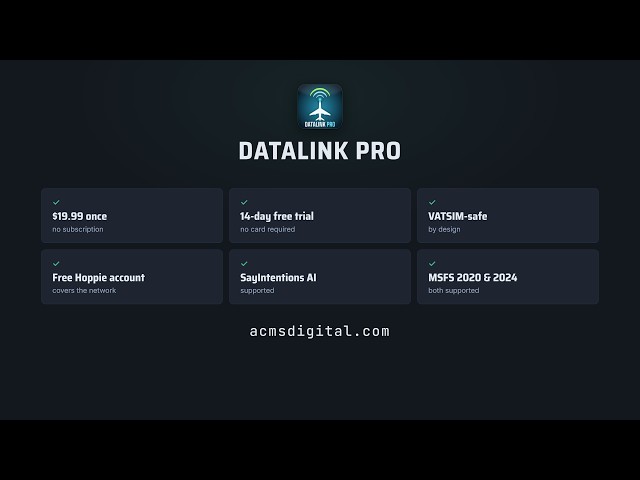
- Microsoft Flight Simulator 2020 and 2024, connected natively through SimConnect
- Windows PC, runs alongside the sim
- Works with your SimBrief flight plans
One purchase, no subscription. A free 14-day trial is available at acmsdigital.com if you'd like to fly with it before buying.
标签
使用需求
Required
Windows 10 or 11 (64-bit)
Microsoft Flight Simulator 2020 or 2024
A SimBrief account (free) for flight plans
An ACARS network account: either SayIntentions AI (paid subscription) or a free Hoppie logon code from hoppie.nl
Please note before buying: Datalink Pro cannot send or receive messages on its own. It connects through an ACARS network, so you need one of the two accounts above. The SayIntentions AI subscription and the Hoppie code are separate from this purchase.
Optional, each unlocks one extra feature
FSUIPC7 for sharper final loadsheet timing
A thermal printer for the hardware printing feature
A tablet or phone on your home network for the EFB mirror
The free Datalink Telex in-sim toolbar add-on, a small community package you extract into your MSFS 2020 or 2024 Community folder
Datalink Pro is a lightweight companion app that runs alongside the simulator. If your PC runs Microsoft Flight Simulator, it can run Datalink Pro. The installer is about 144 MB and nothing else needs to be installed first.
推荐商品

€ 14.00
$
USD 16.18
所有商品的售价基准为欧元,其他货币价格仅供参考!£
GBP 12.00
所有商品的售价基准为欧元,其他货币价格仅供参考!¥
CNY 109.18
所有商品的售价基准为欧元,其他货币价格仅供参考!
€ 14.99
$
USD 17.32
所有商品的售价基准为欧元,其他货币价格仅供参考!£
GBP 12.85
所有商品的售价基准为欧元,其他货币价格仅供参考!¥
CNY 116.91
所有商品的售价基准为欧元,其他货币价格仅供参考!
€ 14.99
$
USD 17.32
所有商品的售价基准为欧元,其他货币价格仅供参考!£
GBP 12.85
所有商品的售价基准为欧元,其他货币价格仅供参考!¥
CNY 116.91
所有商品的售价基准为欧元,其他货币价格仅供参考!
€ 7.90
$
USD 9.13
所有商品的售价基准为欧元,其他货币价格仅供参考!£
GBP 6.77
所有商品的售价基准为欧元,其他货币价格仅供参考!¥
CNY 61.61
所有商品的售价基准为欧元,其他货币价格仅供参考!
€ 15.50
$
USD 17.91
所有商品的售价基准为欧元,其他货币价格仅供参考!£
GBP 13.29
所有商品的售价基准为欧元,其他货币价格仅供参考!¥
CNY 120.88
所有商品的售价基准为欧元,其他货币价格仅供参考!
€ 12.00
$
USD 13.86
所有商品的售价基准为欧元,其他货币价格仅供参考!£
GBP 10.29
所有商品的售价基准为欧元,其他货币价格仅供参考!¥
CNY 93.59
所有商品的售价基准为欧元,其他货币价格仅供参考!
€ 43.00
$
USD 49.68
所有商品的售价基准为欧元,其他货币价格仅供参考!£
GBP 36.86
所有商品的售价基准为欧元,其他货币价格仅供参考!¥
CNY 335.35
所有商品的售价基准为欧元,其他货币价格仅供参考!
€ 7.99
$
USD 9.23
所有商品的售价基准为欧元,其他货币价格仅供参考!£
GBP 6.85
所有商品的售价基准为欧元,其他货币价格仅供参考!¥
CNY 62.31
所有商品的售价基准为欧元,其他货币价格仅供参考!