0

DATALINK PRO - ACARS DISPATCH FOR MSFS

€ 17.30
DATALINK PRO - ACARS DISPATCH FOR MSFS

DATALINK PRO - ACARS DISPATCH FOR MSFS

ACMS DIGITAL SYSTEMS

Anti-Piracy Warning

Protecting Your Purchase

The flight simulation add-ons you are purchasing are legally protected and copyrighted on an international level. This ensures that the creators' rights are upheld and their innovative work is safeguarded.

Why Piracy Hurts Everyone

Piracy undermines the dedication and creativity of developers. When you download or distribute pirated add-ons, it impacts the creators' ability to continue producing high-quality content. This affects the entire community by reducing the availability of new features and updates.

Consequences of Piracy

  • Legal Risks: Engaging in piracy can lead to severe legal consequences, including fines and prosecution.
  • Security Threats: Pirated software often carries malware, risking your personal data and system security.
  • Lack of Support: Unauthorized copies do not receive official support or updates, leading to potential issues and vulnerabilities.

How You Can Help

  1. Purchase Legitimately: Always buy add-ons from authorized sellers like SimMarket to ensure you receive authentic products.
  2. Report Piracy: If you encounter pirated add-ons, report them to the authorities or the original creators.
  3. Educate Others: Spread awareness about the negative impacts of piracy and encourage others to support developers by purchasing legitimate copies.

Thank you for supporting the flight simulation community and contributing to a fair and innovative marketplace.

Details


Datalink Pro is a dispatch office for Microsoft Flight Simulator. It watches your flight through SimConnect and sends you the company messages an airline crew actually gets: performance cards, loadsheets, fuel slips, clearances, maintenance traffic. They travel over a live ACARS network, so they arrive in the aircraft the same way real ones do.

Load your SimBrief plan and a named dispatcher picks up the flight and works it until you're parked. Dispatchers run eight-hour shifts on Chicago time, so on a long leg you get handed over mid-air with a proper handoff message.

What arrives without you asking

  • A takeoff performance card about 20 minutes before departure: weights, V-speeds, runway, flap, thrust. You choose whether it's built from your SimBrief figures or from the aircraft's own numbers.
  • A final card and a load closeout once boarding finishes, in real airline layout, with dual CG columns, stab trim, souls on board, and an RVSN revision number if it gets reissued. Weights come off the sim when the sim provides them and fall back to your SimBrief plan when it doesn't.
  • A fuel slip when refuelling settles: prior fuel, uplift in pounds and gallons, density, cost, and a flag on partial uplifts. Works whether you fuel through GSX, the MSFS fuel page, an EFB, or the slider.
  • The AUTONOTOC dangerous goods cycle when there's DG in the hold. Advisory, ID prompt, acknowledgement.
  • OUT, OFF, ON and IN detected from brakes, ground speed, altitude and shutdown, each one acknowledged by dispatch the way a real AOC does it.
  • Position reports above FL180 at 15, 30 or 60 minute intervals, naming the FMC's actual next waypoint with an ETA recalculated from your ground speed.
  • EDCT slots before pushback. Realistic mode checks the FAA NASSTATUS feed for a genuine ground delay program at your destination, or triggers on low ceilings and visibility in the destination METAR. Simulated mode if you just want the workflow on most flights. WILCO to accept your slot, UNABLE to ask for another one, and push early and the company sends you a violation.
  • SIGMET cards when significant weather sits on your filed route, telling you where the hazard is relative to your track instead of handing you a raw bulletin. Turbulence and icing reports relayed by other company aircraft, built from live NOAA advisories. A sharp G-load in cruise files your own turbulence report automatically.
  • The connecting passenger list about 45 minutes out, wheelchairs included.
  • On descent, the arrival sequence: gate status, then gate services and crew connections, then an APU reminder where the stand has ground air. Gates quoted are real stands at that airport, pulled from OpenStreetMap.
  • A wrap-up telex after you park, with block times, fuel burn and all four OOOI times.

Nothing asks for a response during takeoff, climb, descent or landing. Non-urgent traffic waits until you're out of the busy phases.

Clearances and CPDLC (SayIntentions only)

CPDLC, PDC and oceanic clearance run over SayIntentions AI. On Hoppie they're greyed out and everything else on this page still works.

Request a PDC and route, SID, altitude, departure frequency, squawk and runway come back by datalink. Oceanic clearance takes entry fix, ETA, level and Mach, mostly pre-filled from the OFP. CPDLC logs on to a controlling centre for level, speed, direct-to, offset and "when can we expect" requests, each with a reason attached, and answers with WILCO, ROGER or UNABLE.

On VATSIM or IVAO, Datalink handles the company side and the network handles ATC. Emergency wording is blocked from reaching the live network in either direction.

Talk to the company in plain English

Type a question the way you'd say it. Ask whether the weather will hold and dispatch reads the current METAR and TAF at that field before answering. Ask about the crew hotel and you get a real hotel at your destination. Medical, security, customs, bird strikes, ride reports, ground and passenger services, 18 topics in all, handled on the same channel. It copes with cockpit typing (QQ for a question mark, missing apostrophes, run-on messages) and when nothing matches, dispatch asks you a question rather than inventing an answer.

Failures and maintenance (off by default)

Switch it on and system failures arrive with the dispatch and maintenance traffic an airline would generate around them.

PMDG 737: 112 curated faults, read out of PMDG's own failure system. Datalink never injects anything into the PMDG.

Fenix A319/A320/A321: 318 failures across 28 ATA chapters with real Airbus MEL codes, posted into and cleared through the EFB.

iFly 737 MAX 8: the same treatment off the iFly EFB.

Squawk a defect in plain English and maintenance control matches it to a MEL item and opens a numbered work order. Defer it and it stays with that specific tail across flights and sessions until maintenance clears it. How long that takes is a setting: cleared on turnaround, a few hours, or airline ground times with a hangar queue and an expedite option. A fleet page lists every open defect across the tails you've flown.

You set how often failures happen, which systems can fail and which phases stay clear. The standard pool contains nothing that would need an emergency squawk on a live network. Harder faults sit behind a gate you have to acknowledge.

Aircraft

The PMDG 737 gets read straight off the CDU screens, so position reports name the FMC's real next waypoint, and the V-speeds and weights you typed get cross-checked against your flight plan. Fenix and iFly performance comes off the EFB. Everything else you fly gets the full message set, built from SimBrief and live sim weights.

American, Delta, United, Southwest and Alaska profiles are built in and picked automatically from your SimBrief callsign, alongside a generic carrier. Drop your own airline PNG into a folder and it shows up on the dashboard.

Where it runs

A desktop app on your Windows PC next to the sim. A tablet mirror puts the same interface on any iPad, phone or second monitor on your home network, with nothing to install on the device. A free companion add-on puts a Telex window in the MSFS toolbar, so you can fly a whole leg without alt-tabbing. It prints to an 80mm thermal receipt printer if you want paper slips.

The message formats

The formats aren't invented. They're rebuilt from captured airline ACARS traffic, layout by layout. The loadsheet header is exactly 21 characters because that's the CDU width. A reissued loadsheet carries an RVSN revision number. The dangerous goods notice quotes the city pair in IATA rather than ICAO and comes back unsigned, because the real one does. Airbus performance cards say THS and VLS where Boeing cards say STAB TRIM and VREF. If you've seen the real thing on a flight deck, you'll recognise it.


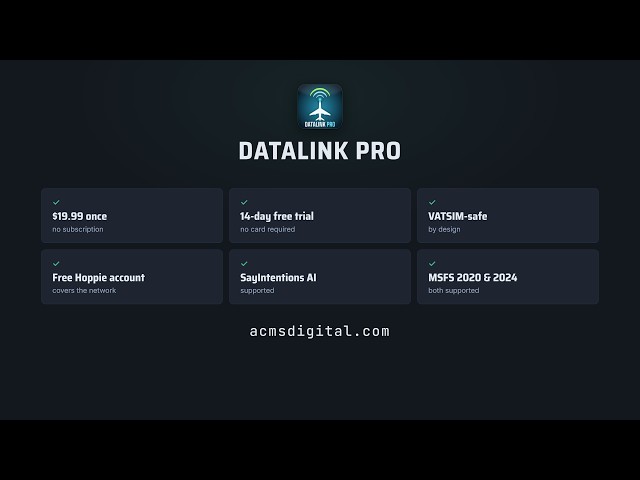
One purchase, no subscription. Activate once and it runs offline afterwards with a quiet weekly check. Two devices per licence, and you can free a machine up yourself from the web portal.

There's a 14-day free trial at acmsdigital.com, no card needed, if you'd rather fly with it before buying.

Tags

Requirements

Microsoft Flight Simulator 2020 or 2024. Connects natively through SimConnect, with no bridge and no plugin.

Windows PC, running alongside the sim. The installer needs no admin rights.

A SimBrief account. Datalink Pro builds the flight from your SimBrief OFP.

An ACARS network account, either SayIntentions AI or Hoppie. The setup wizard finds your SayIntentions key for you, and a Hoppie logon code is free. CPDLC, PDC and oceanic clearance need SayIntentions; everything else works on either network.

An internet connection in flight, for the ACARS network, live weather, FAA slot data and airport gate data. Licence activation is one-time, after which the app runs offline with a quiet weekly check.

FSUIPC7 is optional. With it, departure paperwork fires on the actual forward door close instead of a five minute fallback.

Any aircraft works. The PMDG 737, Fenix A319/A320/A321 and iFly 737 MAX 8 add EFB and CDU integration on top.

Customers who bought this product also purchased

FSREALISTIC+ MSFS24 (CHASEPLANE REQUIRED)
€ 24.99
STRATAWX MSFS24
€ 24.99
SIMSOFT AIRPORTINFO 2.0
SIMSOFT AIRPORTINFO 2.0 SIMSOFT
MFS20
MFS24
P3D5
P3D6
X-Plane
€ 7.00
LGIR - NIKOS KAZANTZAKIS INTL. MSFS24
€ 13.00
29PALMS LGSR SANTORINI AIRPORT MSFS24
€ 17.95
FLIGHTBAG PRO
FLIGHTBAG PRO WAYMARK SOFTWARE
MFS20
MFS24
P3D5
P3D6
X-Plane
€ 16.72
FSDG FLIGHT SUITE PRO
FSDG FLIGHT SUITE PRO FSDG
MFS20
MFS24
P3D5
P3D6
X-Plane
€ 8.39
AVX SORTER: MSFS & X-PLANE ADDON MANAGER
€ 12.99

Install our desktop application

Installs directly in the App

Download Now

Anti-Piracy Warning

Protecting Your Purchase

The flight simulation add-ons you are purchasing are legally protected and copyrighted on an international level. This ensures that the creators' rights are upheld and their innovative work is safeguarded.

Why Piracy Hurts Everyone

Piracy undermines the dedication and creativity of developers. When you download or distribute pirated add-ons, it impacts the creators' ability to continue producing high-quality content. This affects the entire community by reducing the availability of new features and updates.

Consequences of Piracy

  • Legal Risks: Engaging in piracy can lead to severe legal consequences, including fines and prosecution.
  • Security Threats: Pirated software often carries malware, risking your personal data and system security.
  • Lack of Support: Unauthorized copies do not receive official support or updates, leading to potential issues and vulnerabilities.

How You Can Help

  1. Purchase Legitimately: Always buy add-ons from authorized sellers like SimMarket to ensure you receive authentic products.
  2. Report Piracy: If you encounter pirated add-ons, report them to the authorities or the original creators.
  3. Educate Others: Spread awareness about the negative impacts of piracy and encourage others to support developers by purchasing legitimate copies.

Thank you for supporting the flight simulation community and contributing to a fair and innovative marketplace.

€ 17.30

Share with your friends

Copy the link or share directly on a social network